Windows Server Monitoring

Monitor All Windows Servers

 $125 per Physical Server

VIEW PRICE LIST

WINDOWS PLATFORMS:

  • Windows NT SP6A
  • Windows 2000
  • Windows 2003
  • Windows 2008
  • Windows 2008 R2
  • Windows 2012

PRODUCT BENEFITS:

  • Easy to Use
  • 24/7 Real Time Monitoring
  • Automated Remediation
  • Alerting and Troubleshooting
  • Out-of-the-Box Application Monitoring


  • Performance Analysis
  • Physical and Virtual Environment
  • Management Reporting
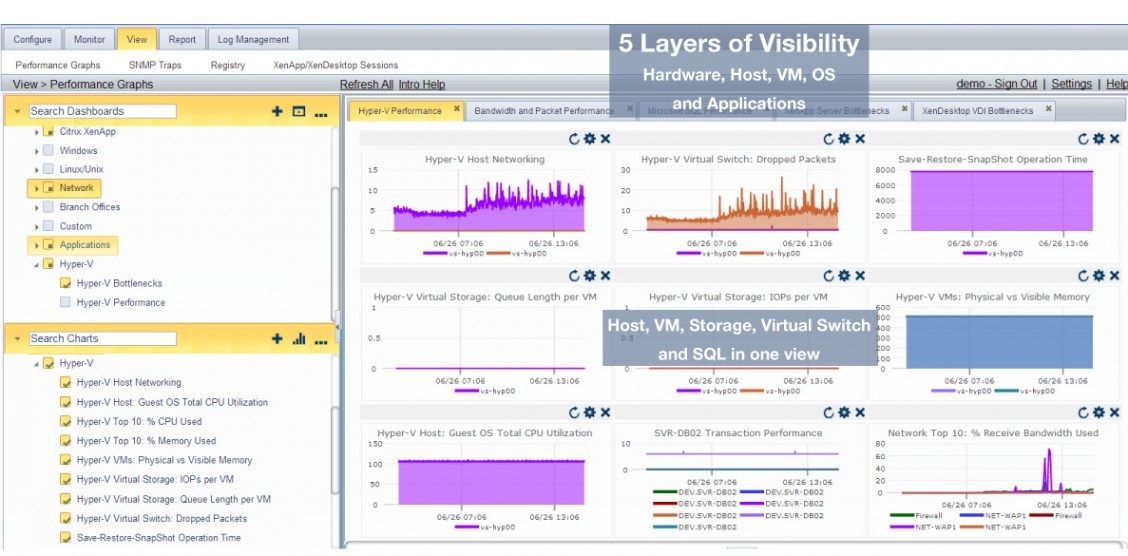
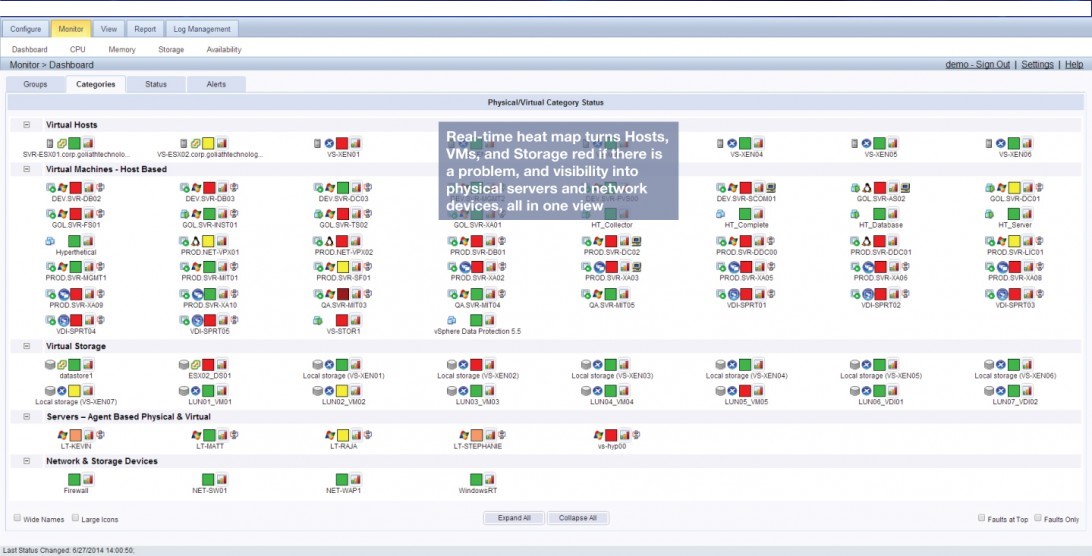
  • Dashboards with Easy Drill Down
  • Affordable

MonitorIT all Windows NT SP6A – Windows 2012 Platforms 

Comprehensive Virtual Infrastructure Monitoring

  • Agentless Monitoring Leveraging Hypervisors APIs
  • “Intelligent Agents” for Deep Application Level Data and Enhanced Auto Remediation
  • Citrix XenCenter & VMware vCenter Plug-in
  • Physical Infrastructure:
    • Servers
    • Networks
    • Storage
    • Applications

Easy to Use: “MonitorIT in Minutes”

  • Auto Discovery of Virtual and Physical Infrastructure
  • Out-of-the-Box Monitoring Rules – No Programming
  • “Click Install” of “Intelligent Agents”
  • Multiple Hypervisors – One Solution

Real Time Monitoring

  • Key Performance Metrics:
    • CPU Load
    • Memory & Swap Utilization
    • Network Latency & Bandwidth
    • Disk Utilization
  • Dashboards with “click” Drill Down
  • Advanced Alerting and Root Cause

Enterprise Functionality

  • Management Reporting
    • Compliance/Audit
  • Physical and Virtual Environments
  • Automated Remediation and Recovery
  • Central Console for:
    • Servers
    • Applications
    • Storage
    • Networks
    • Desktops
    • Databases
  • Ticket Management
  • Remote Management

What we Monitor:

Performance Counter Monitoring

CounterWatch for Windows monitors the performance of your Windows servers via the available performance counters installed with Windows and all Microsoft applications, and for various 3rd party applications that take advantage of the performance counter option in Windows. Performance Counters are available for all aspects of the hardware, including CPU, Disk, Memory, and Network, and software applications. Administrators can create their own custom CounterWatch report collection set/templates to monitor, analyze, diagnose & report, and make recommendations for improving performance and solving operational problems. Additionally, administrators can optionally have MonitorIT use this comprehensive performance data to trigger alerts if specified thresholds are exceeded, and you can generate consolidated performance reports, or dynamic graphs. All CounterWatch data is logged and can be reported to Excel via a CSV file to provide baseline and trending data.

CounterWatch for Linux/Unix monitors CPU utilization and Load Average counters. All of the various CounterWatch features available for Windows CounterWatch are also available for these Linux/Unix Counters including monitoring and alerting for exceeding thresholds, for creating dynamic graphs, and for baseline and trend reports.

Real-Time Event Log Monitoring and Archive Log Management

EventLogWatch monitors Windows servers in real-time for entries into all the Microsoft Event Logs as well as 3rd party Custom Event Logs. The new EVTX Event Log formats introduced with Windows Server 2008 is supported as well as the ‘classic’ EVT Event Log format for all earlier Windows versions. This provides administrators with the ability to monitor real-time virtually any and every event of significance that occurs in Windows server operations. You can choose to be Critical events can be set to alert necessary personnel for immediate action and response.

When Windows auditing is enabled, administrators can monitor real-time for a variety of auditing events to the Security Event Log to significantly increase your server security monitoring. These types of security events include a variety of events for Logon, Account Management, Privilege Use, and Policy Change actions.

A powerful Event Log Viewer is provided to display user-selected events based on easily defined filters for:

  • Events in the Archived Event Log files
  • Events in Monitor’s database that were captured with real-time EventLog Watches
  • Events in the actual current Event Log files.

Administrators can filter the monitoring and viewing of Event Log data by Log and Event types, as well as filter based on Event Source, Event IDs, Event Category, and User Name or substring in the Event Descriptions. Filters can be saved and then easily loaded into the viewer again where you have the option to Print, Email, or Export to a CSV file.

Real-Time Process Monitoring

ProcessWatch monitors selected Windows & Linux processes to make sure they are running; and, if necessary, to identify ‘rogue’ processes that should not be running. MonitorIT also has the capacity to restart the processes not running, or terminate the ‘rogue’ processes that are running. CPU & Memory utilization thresholds for running processes can be specified with correlating alerts set if those thresholds are exceeded; optionally ProcessWatch also has the ability to terminate processes that exceed thresholds. All ProcessWatch alerts are logged to MonitorIT’s database, and you can view the history of ProcessWatch alerts in MonitorIT’s “Alert Notifications” report.

Real-Time Services Monitoring

WinServicesWatch monitors selected Windows services to make sure they are running. Alert notifications can be defined to alert when critical Windows services are not running, including services that are ‘hung’ during startup, which MonitorIT can be set to automatically restart. All service failures are logged to MonitorIT’s database, where administrators and managers can view the history of service failures using MonitorIT’s “Alert Notifications” report.

Real-Time Monitoring of Files and Folders/Subfolders

FileWatch enables administrators to monitor select Windows & Linux desktop files, folders and groups of files & folders for additions and deletions. MonitorIT’s alert notification options can be set to alert when watched files or folders have met one of the optional conditions specified. FileWatch’s flexibility enables administrators and compliance officers to monitor 3rd party application log text files, watch for “hacked” files that should not have changed, or monitor key files that you expect to change and be updated on a regular basis. And when you have appropriate Windows auditing enabled, you can know not only what, when, and where but also WHO caused the FileWatch alert.

Monitor Specified Folders for:

  • Creation and Deletion
  • Changes Including files added, deleted, or changed
  • Subfolder creation and deletion
  • Exceeding a maximum size for all the combined files in the folder
  • Exceeding a maximum file count of files in the folder
  • Unchanged for a specified time period
  • Exclude files and subfolders from the monitoring

Monitor Specified Files for:

  • Creation and Deletion
  • Changes in size and/or modified Date/Time
  • Exceeding a maximum size C
  • Containing new text sub-string content
  • Unchanged for a specified time period

Monitor Sets of Files Matching a Wild-card Specification for:

  • Addition and Deletion to the set
  • Changes in size and/or modified Date/Time of any file in the set
  • Combined files in the set or individual files in the set exceeding a maximum size
  • Containing new text sub-string content
  • All files or individual files in the set unchanged for a specified time period

Exclude monitoring files and sub-folders from the wild-card set.

Logical Drive, Physical Memory, and Swap/Page File Monitoring

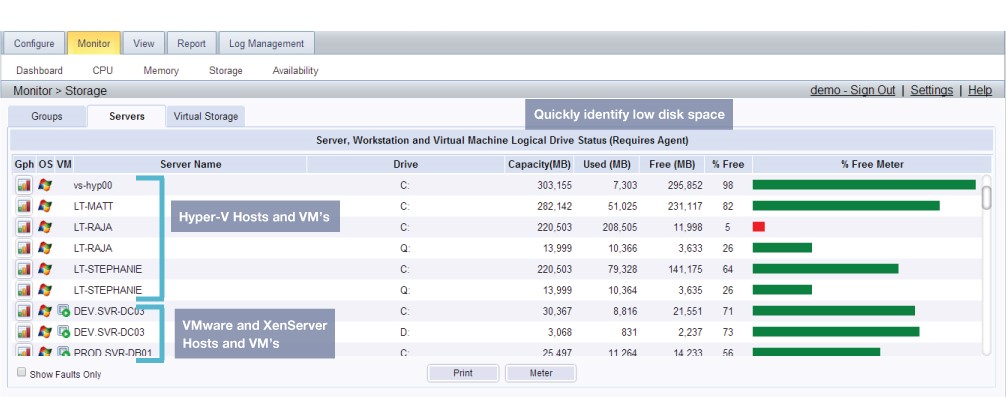
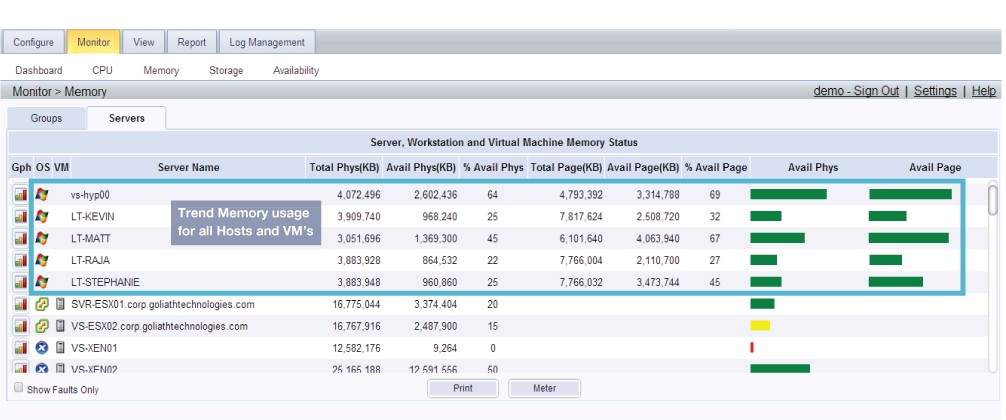
For Logical Drive, Physical Memory, and Swap/Page File monitoring, Linux/Unix & Windows administrators can easily enable an alert notification to be notified when available Logical Drive Free Space, Available Physical Memory or Swap/Page File Free Space drops below a defined threshold.

Extensible Monitoring Programming Platform

CustomWatch provides the ability to extend monitoring of your Windows servers by executing any Windows program, command, script, or batch file executable for remediation that an administrator specifies. MonitorIT runs the executable periodically on the monitored desktop according to a specified schedule. Use the powerful CustomWatch to create your own custom monitors but also use CustomWatch as a central Windows Job Scheduler, and easily manage the scheduled execution of all your jobs across all servers from the central MonitorIT dashboard.

Registry, HW Configuration & Server Availability, and Reboot Monitoring

With MonitorIT’s RegistryWatch, there are any number of monitoring possibilities for critical and important data changes due to the richness of the information maintained in the Registry, both hardware and software. For example, administrators can be alerted when any software is added or removed from a server simply by monitoring a specific Registry Subkey.

Registry & Hardware Configuration monitoring enables administrators to be alerted when hardware configuration changes are detected, or when select Registry Key/Value additions, changes, or deletions are detected. The Hardware configuration of a server is monitored via the WMI information that the Agent tracks, and can detect when changes occur in the hardware configuration.

Linux/Unix & WIndows Server Availability & Reboot Check, can be set to alert administrators when a monitored server reboot/restart event is detected, and when the server is detected as down and not available.

User Logon/Logoff

Monitor thousands of servers from one or more distributed Agents via “agentless” monitoring for interactive User Logon/Logoff status and reporting. You can designate multiple Agents to accomplish this task and thus handle a large population of workstations. Each Agent can handle monitoring of up to 500 servers/workstations for this interactive User Logon/Logoff activity. This give MonitorIT the scalability to monitor up to 10,000 servers while deploying only 20 agents.

Reporting

Feature-rich reporting and analysis tools let you perform real-time and historical assessments of your servers/workstations and network devices, right down to the smallest level of detail. Create custom CounterWatch reports for monitoring and analyzing any performance counters. All reports are generated in HTML for easy distribution and viewing. There are Inventory reports that provide summary information about the servers, workstations and desktops being monitored. And there are ServerWatch reports with features that include the ability to generate a consolidated report on server and services availability and response times for any time period. All reports can be executed manually, or scheduled for automatic, periodic report analysis with complete flexibility in when and what is reported. The automatic reports can be emailed to one or more recipients.

With Windows & SNMP CounterWatch, Active Graphing lets you watch network and system performance levels in real time. Choose from over 25 supported graph types or customize the graphs to display the way you want them to. Display multiple graphs simultaneously, and friendly but sophisticated VCR-like controls let you forward, reverse, fast forward/reverse and stop for optimized visual display and examination. Save your defined Graphs and reopen them at any time to view the selected counters for any time period. Multiple administrators can even view or share the same graph. Changes made by one are automatically applied to the others. In addition, this data is stored in a central database for detailed analysis and reporting. CounterWatch reports provide an intelligent Performance Wizard that identifies performance bottlenecks and recommends a strategy for enhancing performance. This can save countless unnecessary equipment upgrades by helping you maximize the efficiency of the systems already in place.

MSPs & Distributed Enterprises

Managed Service Providers and distributed enterprises can manage remote infrastructures at customer locations and branch offices by leveraging MonitorIT’s encrypted Agent connection for logging and alert notification processing

  • For MSPs, support multiple clients in a single, scalable central MonitorIT Server, with optional separate security settings based on client login and limited to viewing only the clients’ servers, workstations, devices and associated Watches on the various console displays.
  • For Medium-Enterprise Businesses, support multiple administrators and analysts, with optional security settings based on their Windows login and limited to viewing only their responsible servers, workstations, devices and associated Watches on the various console displays.

Please click to expand images

Specific MonitorIT Features:

Remote Site Monitoring

Many distributed enterprises and service providers face challenges in monitoring the virtual environment outside of their core infrastructure. In order to monitor their Citrix XenServer, VMware vSphere and Microsoft Hyper-V virtual hosts remotely, administrators often deploy secondary instances of their monitoring solutions, which complicates management or increases cost because proxies or secondary servers are required. With “Master Agent functionality,” the IT professional can designate any agent at a remote site a master agent and it will monitor remote hypervisors and surrounding infrastructure, sending exception based alerts through the firewall when predetermined thresholds are breached.

Quick to Install and Configure

Monitoring in Minutes–MonitorIT’s ‘out-of-the-box’ installation, gets you up and monitoring within minutes. Without any customization you can begin monitoring for resource utilization, failures, and begin reporting on your environment through our easy to use dashboards, web interface, or plug-ins to VMware vCenter & Citrix XenCenter. Out-of-the-box there are 130 preconfigured monitoring rules or MIT PAKs that enable you to gain visibility into your virtual hosts, physical servers, virtual machines, application, network devices, and storage.

MonitorIT comes with over 130 pre-configured monitoring rules built into the product, and additional monitoring rules are available to download and post on the MIT Rules Exchange. Below is a sample list of some of the monitoring rules that allow a user to automatically begin monitoring their infrastructure.

Preconfigured Monitoring Rules

By leveraging both MonitorIT’s agent and agentless monitoring flexibility, users can easily build new watch rules without having to perform any programming or complex scripting. Users can apply our easy to use new Watch guide to monitor any application or device for which a preconfigured watch rules does not already exist.

MonitorIT can monitor anything in your infrastructure that has processes, services, generates log files, is SNMP enabled, or generates Syslog messages. If you have any web applications, MonitorIT can monitor both the performance and availability. This flexibility is enabled with our easy-to-use ‘Monitoring Rules’ templates where administrators simply choose the key criteria to be monitored and the alert actions to be taken. Users can even share watches with other customers and download new monitoring rules as they are posted to the MIT Rules Exchange.

Comprehensive Virtual Infrastructure Monitoring

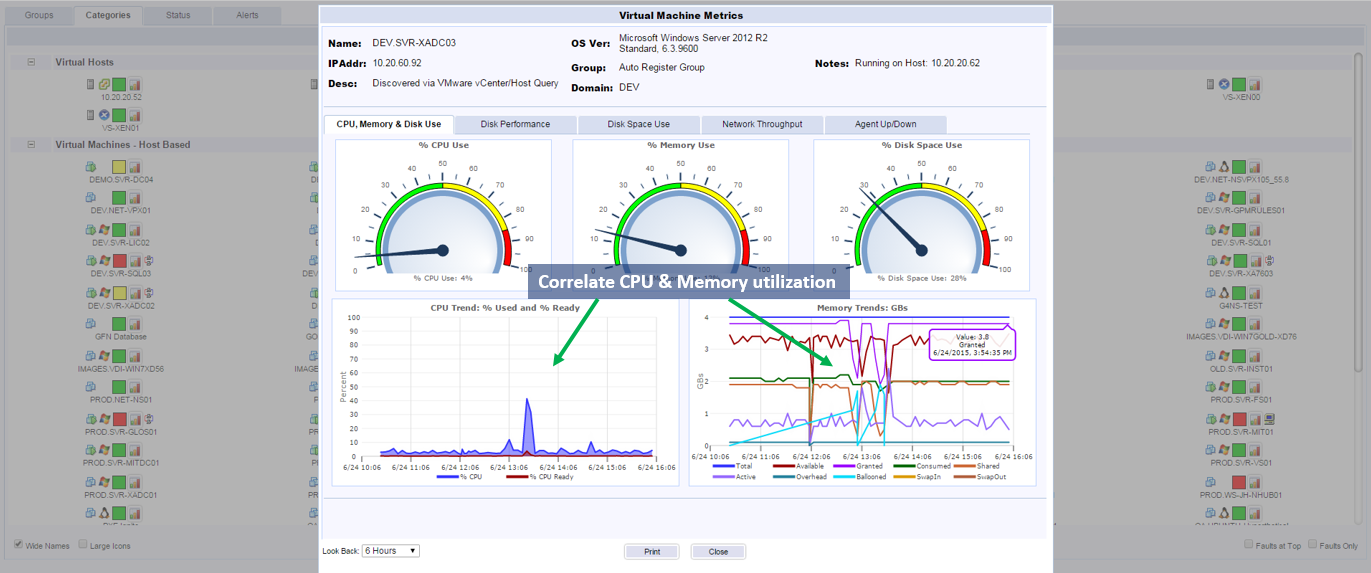
There is no hypervisor limitation. MonitorIT ships today with complete support for monitoring the entire virtual environment, including metrics from the hypervisor, directly from the virtual machines via an “Intelligent Agent”, and the associated physical infrastructure. This is distinctly different from other monitoring solutions as they are likely to be limited to only those metrics provided by the hypervisor which don’t include granular data about the virtual machines and their applications or the physical environment. MonitorIT provides “Comprehensive monitoring of the virtual infrastructure”

XenCenter/vCenter Integration: MonitorIT’s GUI integrates with Citrix XenCenter or vCenter via a Tab plug-in, so that a single console can be leveraged for a seamless operation. Certainly, the native MonitorIT console can be used even if a user doesn’t have XenCenter or vCenter, as well as integrate with standard infrastructure management consoles.

Not Just Virtual Servers: The virtual infrastructure is not a silo in and of itself; total availability and performance can be severely impacted by the supporting architecture which often include physical servers, network devices, and storage. As a complete and comprehensive monitoring solution, MonitorIT has the ability to monitor all of the components in a modern IT infrastructure from a single console. MonitorIT supports  monitoring for all Windows Operating Systems, and deep monitoring of associated Windows applications, including Microsoft SQL Server, Exchange Server, IIS, and third-party applications such as Citrix XenApp and XenDesktop. MonitorIT also has support for monitoring all Linux/Unix variations, from RedHat to Solaris, including HP-UX and IBM AIX. Finally, MonitorIT monitors the underlying network and storage infrastructure.

Intelligent Agent: The “Intelligent Agent” has several unique features that make it worthy of being considered intelligent. First, it is very easy to deploy and configure relative to most agents. Next, it is able to capture deep diagnostic metrics with little resource utilization, typically only 1MB in size, and utilizes on average 0.1% of CPU and 16MB of Memory. Finally, any agent can be designated a “Master Agent” and then be tasked with capturing SNMP Traps and Syslog messages from any such enabled device in your environment. If an SNMP Trap or Syslog alerting condition is triggered, the “Master Agent” will then send alerts to the Monitor IT server. This is incredibly helpful as it provides a facility for deployed agents, at a remote site, behind a firewall to monitor network devices, while negating the requirement to deploy an additional monitoring server to each location.

Flexible and Easy to Use

Agent and Agentless: Provides the user with ultimate flexibility, visibility, and control, MonitorIT is both agent based for monitoring Windows virtual machines, Linux & Unix virtual machines, and agentless via SNMP, Syslog messages, and hypervisor integration to Citrix XenServer & VMware vSphere ESX & ESXi

Multi-Tenant Views: Monitor IT elegantly operates in a service provider environment so that individual or comprehensive views of all customers can be monitored. Customizable group, security and Watch list settings allow multiple administrators to effectively manage the IT assets and applications in disparate client environments from one screen.

  • Group Assets by Customer: Group physical and virtual hosts, virtual machines, storage, network devices, and desktops by customer or location.
  • Management Views: Customize to control views within our product to show the customer just their environment while the consultant or service provider can see and manage all customers. Enable executives and account managers to run reports and see dashboards for their specific customers without the rights to inadvertently change configurations.
  • Apply Security by Role and Customer: Depending on security requirements configure Customer, Engineer, and/or Management access.
  • Remote Management: Often the “tenants” are separated by firewalls; MonitorIT has the ability monitor those environments without deploying any additional servers or proxies. Agents deployed to those locations can securely connect back to the MonitorIT central server over an encrypted connection.

Custom Reports

  • Out-of-the-box reports to analyze IT infrastructure health, perform capacity planning around memory and storage utilization, security reporting, and even up-time & chargeback data
  • Report on your virtual hosts, virtual machines, storage, and any physical servers in your environment for CPU, Memory, Storage, Disk I/O trending.
  • Dynamic dashboards for reporting on resource utilization, alerting status, and graph based metrics

Enterprise Functionality

Consolidated Enterprise Dashboards: View Physical and Virtual Servers, Hypervisor Metrics, Network, Desktop, Applications and storage from one central location. MIT metrics can be viewed in XenCenter or vCenter via a smart plug-in or integrated with Enterprise Management Suites.

Highly Scalable: Monitor IT is scalable to thousands of servers, network devices and other elements of the IT Infrastructure

Automated Remediation and Recovery: Automated remediation and recovery actions can be created based on thresholds and dependencies.

Full Infrastructure Monitoring: Servers, Networks, Applications, Desktops and Storage

Central Console: All monitoring, alerting, diagnosing, graphing, collecting, and reporting information available at the central MonitorIT Server can be accessed from anywhere with MonitorIT’s remote IE based console.

Integration with Ticketing Systems: Ease the difficulty engineers face with gathering accurate, organized information to resolve problems with the infrastructure. This integration can be performed in one of three ways:

  • Email: MonitorIT can structure an email to be retrieved by a ticketing system, and composed with customizable details to communicate enough information for a resolution
  • SNMP: Verbose SNMP traps can be generated and automatically directed to be retrieved
  • SYSLOG: Similarly to SNMP, a Syslog message can be generated, also encapsulating all the necessary details about an alert condition
Physical and Virtual Environment: The physical infrastructure can impact the performance of virtual servers and workstations. MonitorIT manages both from a central console. It is a complete and comprehensive server, workstation and network monitoring solution. It has support for monitoring all Windows OS systems, and deep monitoring of associated Windows applications, including Microsoft applications such as SQL Server, Exchange Server, IIS, and third-party applications such as Citrix XenApp and XenDesktop. MonitorIT also has support for monitoring all Linux/Unix variations, from Red Hat to Solaris, including HP-UX and IBM-AIX. Finally, MonitorIT monitors the underlying network and storage infrastructure.

Cost Effective

Price points that are drastically lower than other enterprise solutions with similar functionality and scalability. Learn more

Purchase only the number of licenses as required; easily add licenses as you grow.
Support for Service Providers with SPLA licensing options.

]

MonitorIT’s Intelligent Agent

All agents are NOT created equal, agent based solutions are difficult to deploy and configure, and agentless tools provide limited metrics. MonitorIT’s Intelligent agent deploys within minutes, utilizes minimal resources, and monitors the physical and virtual environments.

Go to Video

What we Monitor

In this brief video, we’ll talk about the flexibility and comprehensiveness of MonitorIT that allows a user to monitor the entire IT infrastructure from one central console.

Go to Video

Remote Site Monitoring with Master Agent Capability

The “Master Agent” feature is a subset of the overall Intelligent Agent functionality. In this video, we explain how the “Master Agent” monitors and manages remote locations quickly and easily.

Go to Video

MonitorIT can monitor any application that has processes, services, or generates log files or events.

Below is a sample of applications supported using the out-of-the-box monitoring rules. 

Web Services

  • Apache HTTP
  • Apache Tomcat
  • Oracle WebLogic
  • Microsoft IIS
  • Lighttpd

OS Services

  • Process Monitoring
  • Windows Event Log
  • Windows Performance Counters
  • Windows Services
  • Windows Print Services
  • Windows Server Update Services

Files

  • File Age
  • File Change
  • File Count
  • File Existence
  • File Size
  • Parsing the content strings

Database

  • Microsoft SQL Server
  • PostgreSQL
  • IBM DB2
  • SAP Sybase
  • MySQL
  • Oracle
  • Informix

Middleware/Portal

  • IBM WebSphere
  • Microsoft SharePoint
  • Oracle Fusion
  • IBM WebSphere Message Broker
  • Microsoft Biztalk Server
  • Oracle WebLogic Server
  • IBM WebSphere MQ
  • SAP NetWeaver
  • TIBCO

ERP

  • SAP
  • Lawson/Infor
  • Oracle PeopleSoft
  • Oracle eBusiness Suite
  • Oracle Siebel CRM

Microsoft

  • Microsoft Active Directory
  • Microsoft Group Policy Objects
  • Microsoft Exchange Server
  • Microsoft Commerce Server
  • Microsoft SQL Server
  • Microsoft Outlook Web Access
  • Microsoft Office Live Meeting Server
  • Microsoft Office Communications Server
  • Microsoft Dynamics
  • Microsoft SharePoint
  • Microsoft Great Plains
  • Microsoft BizTalk Server
  • Microsoft IIS
  • Microsoft App-V
  • Microsoft Forefront
  • Microsoft Lync Server

Email and Communication Servers

  • Microsoft Office Communications Server
  • Microsoft Office Live Meeting Server
  • Microsoft Outlook Web Access
  • BlackBerry Delivery Confirmation
  • Microsoft Exchange Server
  • BlackBerry Enterprise Server
  • Microsoft Exchange Server
  • POP3 Round Trip Email
  • VMware Zimbra
  • IMAP4 Round Trip Email
  • Lotus Domino Servers
  • Sendmail
  • IBM Lotus Notes
  • MAPI Round Trip Email

VoIP Call Managers

  • Cisco VoIP Unified Communication
  • Avaya Aura
  • Siemens Voice Solutions
  • Cisco CallManager
  • Aastra Technologies

VDI & Application Delivery

  • Citrix XenDesktop
  • VMware View
  • Microsoft App-V
  • AppZero
  • Citrix XenApp
  • VMware ThinApp
  • Novell ZENworks
  • Symantec Workspaces

Backup

  • Symantec Backup Exec
  • IBM Tivoli Storage Manager (TSM)
  • CA Technologies ARCserve
  • Acronis Backup & Recovery
  • Commvault Simpana
  • Dell AppAssure
  • NetVault Backup

Security

  • MacAfee Total Protection
  • Microsoft Forefront
  • Check Point Protection Suite
  • Symantec Endpoint Protection
  • Trend Micro OfficeScan
  • Sophos UTM

Financial

  • Microsoft Great Plains
  • Sage Peachtree
  • Xactly Incent
  • Intuit Quickbooks
  • Sage (MAS) 100-500
  • SAP Business One
x
Loading...